1.6 Null values in SQL#
Missing information#
In a real database,
we may have some missing information.
For example,
suppose we had a spouse column in the Student table.
What should we put in this column for students who are not married?
This isn’t actually a case of missing information,
it is a case of bad schema design!
Since many or most students are not married,
it doesn’t make sense to have a column for spouses
in the Student table.
Instead, we can put it in another table
with this schema
(boldface is used to indicate that attributes student1 and student2 together form a key):
Married(student1, student2)
Only students who actually are married would appear in this table.
Sometimes we really do have missing information.
For example,
not every student has a spouse, but
every student does belong to a specific campus.
But suppose we have someone in the Student table
whose campus we don’t know.
There is a correct campus value for this student, we just don’t know it.
What value should we put there?
In SQL, we use a special value called NULL.
Working with NULL#
We can get a NULL value into a table with INSERT INTO.
Recall the Student table:
    csc343h-prof=> SELECT *
    csc343h-prof-> FROM Student;
      sid  | firstname |  surname   | campus |   email   | cgpa
    -------+-----------+------------+--------+-----------+------
     99132 | Avery     | Marchmount | StG    | avery@cs  | 3.13
     98000 | William   | Fairgrieve | StG    | will@cs   | 3.90
     99999 | Afsaneh   | Ali        | UTSC   | aali@cs   | 2.98
       157 | Leilani   | Lakemeyer  | UTM    | lani@cs   | 3.42
     11111 | Homer     | Simpson    | StG    | doh@gmail | 0.40
    (5 rows)
Here we insert a student with no value for first name or campus:
INSERT INTO Student VALUES (35461, NULL, 'Batman', NULL, 'bruce@batcave.com', 4.0);
If we don’t want to allow NULL values in a given column,
we can prevent them
by using a NOT NULL constraint in the table definition.
(We’ll learn about table definitions a little later.)
In fact,
our schema was written so that NULL is not permitted in either
column firstname or campus, so this insertion is unsuccessful.
We can compare a value to NULL using IS NULL.
In our schema, the breadth column in table Course allows
NULL values, so this query may yield some results:
    csc343h-prof=> SELECT *
    csc343h-prof-> FROM Course
    csc343h-prof-> WHERE breadth IS NULL;
     cnum |              name              | dept | breadth
    ------+--------------------------------+------+---------
      100 | CSC for future prime ministers | CSC  |
    (1 row)
Notice that the NULL value in column breadth
is presented in the output as whitespace.
We can also compare a value to NULL using IS NOT NULL:
    csc343h-prof=> SELECT *
    csc343h-prof-> FROM Course
    csc343h-prof-> WHERE breadth IS NOT NULL;
     cnum |           name            | dept | breadth
    ------+---------------------------+------+---------
      343 | Intro to Databases        | CSC  | f
      207 | Software Design           | CSC  | f
      148 | Intro to Comp Sci         | CSC  | f
      263 | Data Struct & Anal        | CSC  | f
      320 | Intro to Visual Computing | CSC  | f
      200 | Intro Archaeology         | ANT  | t
      203 | Human Biol & Evol         | ANT  | f
      150 | Organisms in Environ      | EEB  | f
      216 | Marine Mammal Bio         | EEB  | f
      263 | Compar Vert Anatomy       | EEB  | f
      110 | Narrative                 | ENG  | t
      205 | Rhetoric                  | ENG  | t
      235 | The Graphic Novel         | ENG  | t
      200 | Environmental Change      | ENV  | f
      320 | Natl & Intl Env Policy    | ENV  | f
      220 | Mediaeval Society         | HIS  | t
      296 | Black Freedom             | HIS  | t
      222 | COBOL programming         | CSC  | f
    (18 rows)
NULL introduces a third truth value: unknown#
Because of the possible presence of NULL values,
sometimes we don’t know if a condition is true or false!
For example, consider:
    SELECT *
    FROM Student
    WHERE campus = 'StG';
If we have a row with a NULL value for campus,
we cannot determine whether or not it is StG.
In SQL,
if one or both operands is NULL,
a comparison evaluates to “unknown”.
Let’s look at the implications of having this third truth-value.
Impact of NULL values on WHERE#
WHERE is picky: it will not include a row for which the truth-value
of the WHERE clause is unknown.
So in our example above, if we didn’t know a student’s campus,
they would not be included in the result of the query.
NATURAL JOIN is picky also.
You can remember this if you think of a natural join as being
a Cartesian product followed by a WHERE condition.
Impact of NULL values on aggregation#
When we aggregate on a column, for example to find the average,
NULL values in that column are ignored:
NULLnever contributes to asum,avg, orcountNULLmakes no difference to themaxorminof a column, unless every value isNULL. In that case, both themaxand theminareNULL.
Here’s a summary:
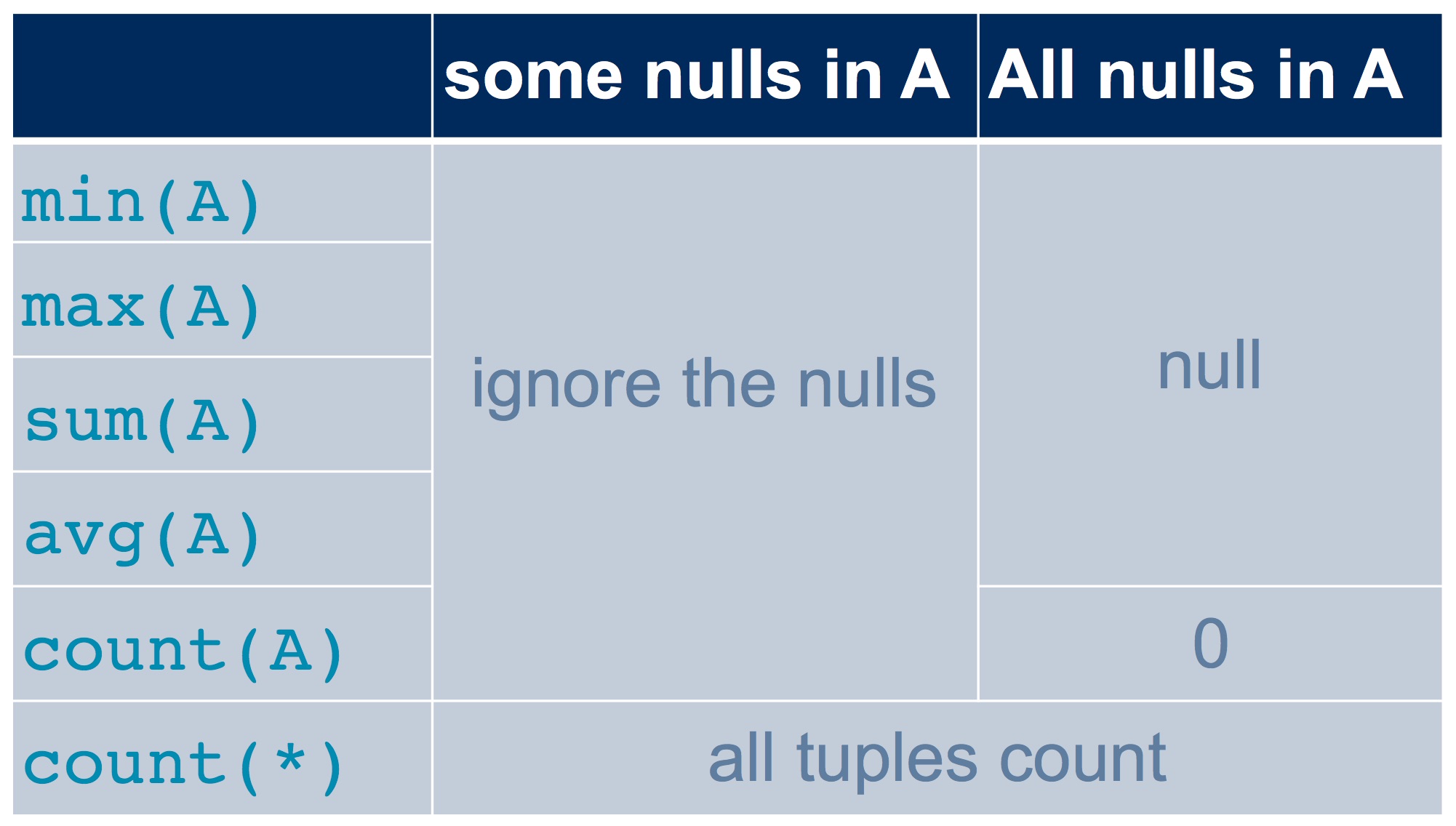
Let’s look at an example that uses this table about students at Runnymede Public School:
    csc343h-prof=> -- Column grade has one NULL,
    csc343h-prof=> -- and column age is entirely NULLS.
    csc343h-prof=> SELECT *
    csc343h-prof-> FROM Runnymede;
     name  | age | grade
    -------+-----+-------
     diane |     |     8
     will  |     |     8
     cate  |     |     1
     tom   |     |
     micah |     |     1
     grace |     |     2
    (6 rows)
Tom’s NULL grade doesn’t contribute to any of the
aggregations below. But count(*) counts rows, and it
includes every row, regardless of any NULLs.
    csc343h-prof=> SELECT min(grade), max(grade), sum(grade), avg(grade),
    csc343h-prof=>        count(grade), count(*)
    csc343h-prof-> FROM Runnymede;

     min | max | sum |        avg         | count | count
    -----+-----+-----+--------------------+-------+-------
       1 |   8 |  20 | 4.0000000000000000 |     5 |     6
    (1 row)
If an entire column is NULL,
it can’t have a meaningful avg, for example.
The value of any aggregation on that column is NULL.
There is one exception:
the COUNT of such a column is 0.
Let’s aggregate on our entirely NULL column, age.
    csc343h-prof=> SELECT min(age), max(age), sum(age), avg(age),
    csc343h-prof=>        count(age), count(*)
    csc343h-prof-> FROM Runnymede;

     min | max | sum | avg | count | count
    -----+-----+-----+-----+-------+-------
         |     |     |     |     0 |     6
    (1 row)
Notice that count(*) gave the same answer as before.
and that count(age) gave 0 because no values in that column are non-null.
There are corner cases that we haven’t examined.
For example,
are two NULL values considered distinct from each other
when we do NATURAL JOIN, set operations, or SELECT DISTINCT?
This behaviour may vary across DBMSs,
so it is best not to assume you know what will happen.
Check the documentation.
Impact of NULL values on boolean conditions#
Now that we have three truth-values, we have to know what happens when we use logical operators in a boolean condition. The truth tables below specify the truth-value for each operator in each of the possible conditions.
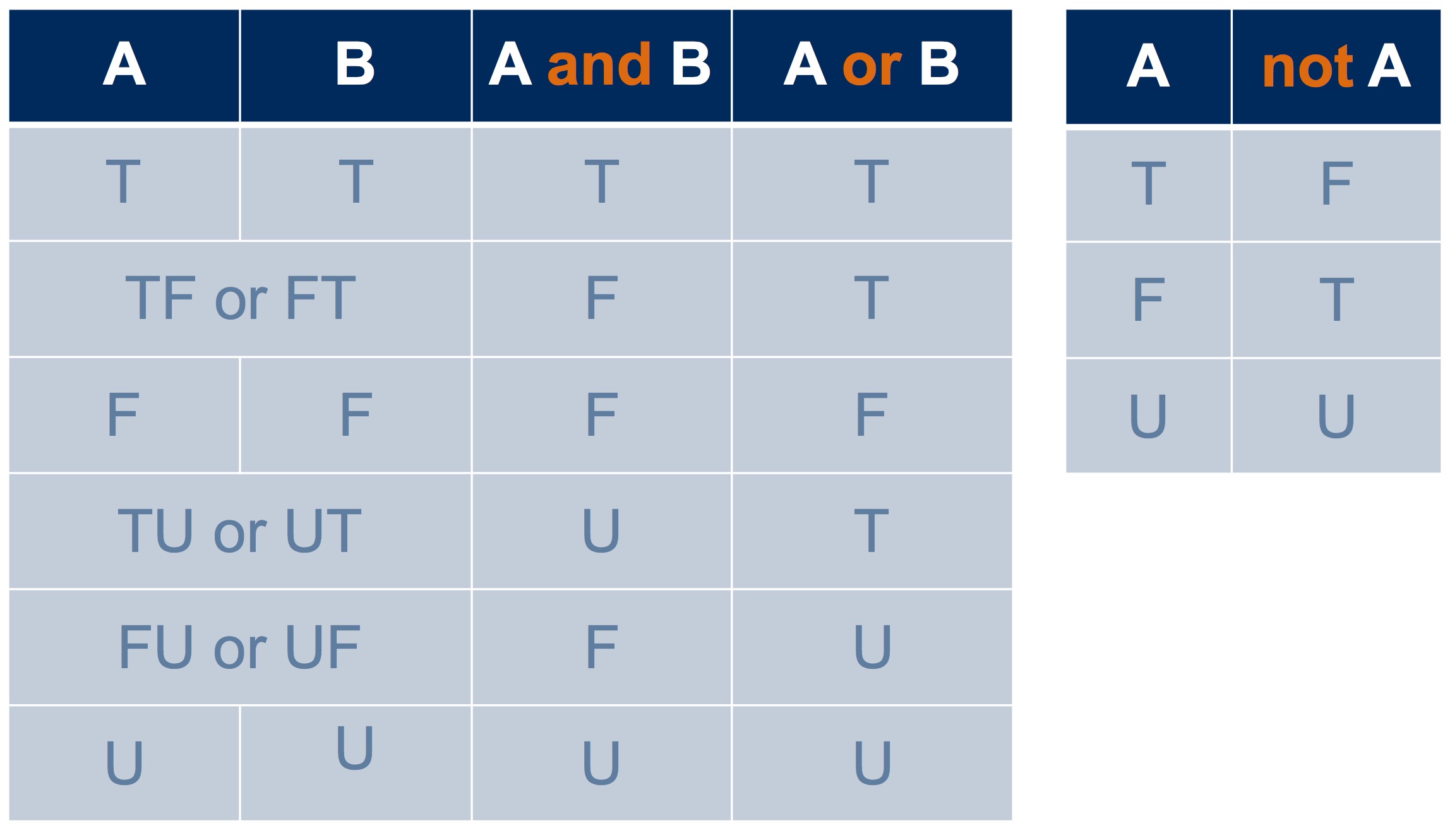
The values in the “and”, “or”, and “not” columns above are common sense if you think about it.
Here’s another way to look at three-valued logic. If we treat true as 1, false as 0, and unknown as 0.5, then taking the minimum of two operands gives us “and”, and taking the maximum gives us “or”:
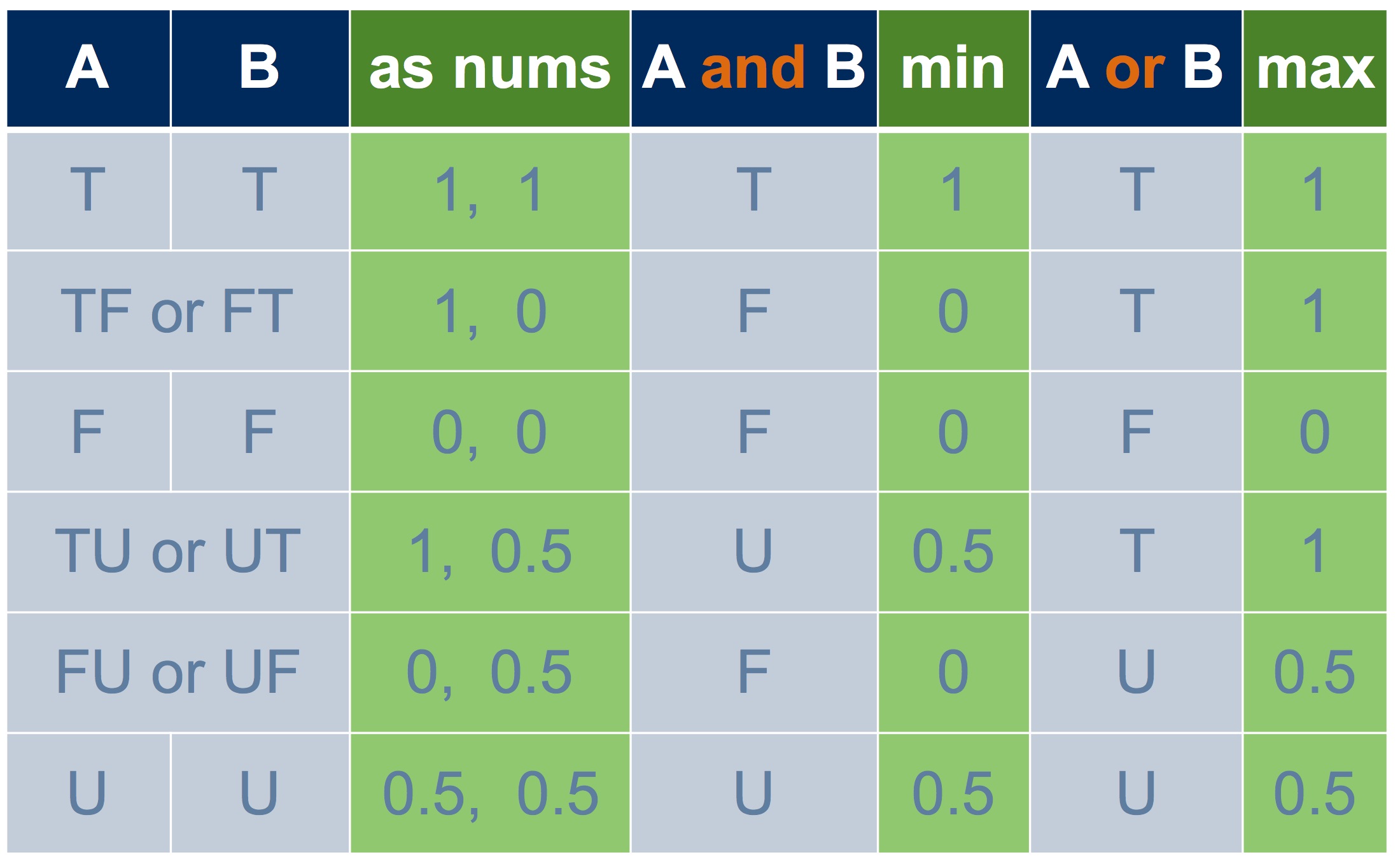
Taking the complement of an operand, gives us “not”:
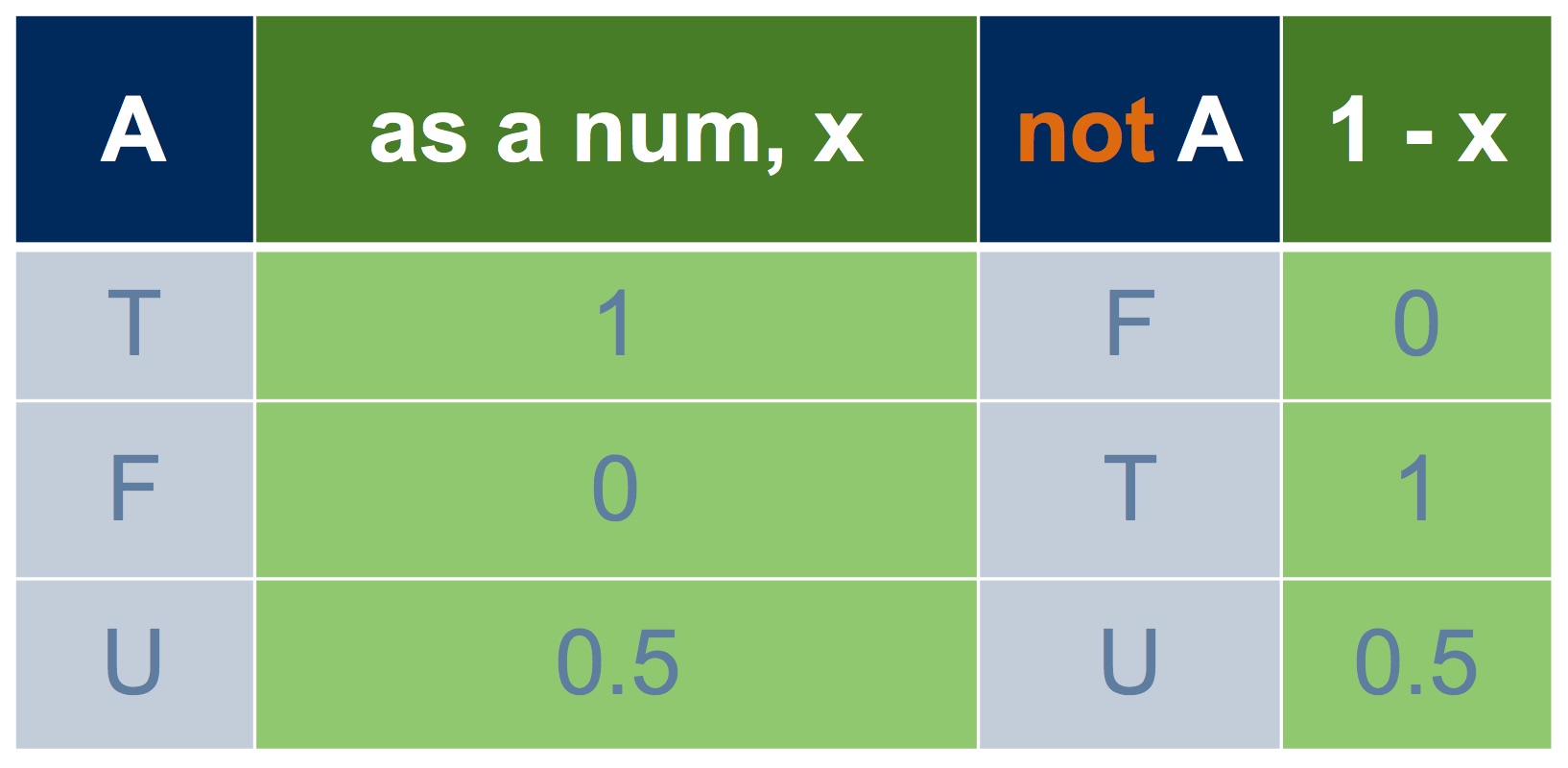
Surprises#
Recall our Course table:
    csc343h-prof=> SELECT *
    csc343h-prof=> FROM Course;
     cnum |              name              | dept | breadth
    ------+--------------------------------+------+---------
      343 | Intro to Databases             | CSC  | f
      207 | Software Design                | CSC  | f
      148 | Intro to Comp Sci              | CSC  | f
      263 | Data Struct & Anal             | CSC  | f
      320 | Intro to Visual Computing      | CSC  | f
      200 | Intro Archaeology              | ANT  | t
      203 | Human Biol & Evol              | ANT  | f
      150 | Organisms in Environ           | EEB  | f
      216 | Marine Mammal Bio              | EEB  | f
      263 | Compar Vert Anatomy            | EEB  | f
      110 | Narrative                      | ENG  | t
      205 | Rhetoric                       | ENG  | t
      235 | The Graphic Novel              | ENG  | t
      200 | Environmental Change           | ENV  | f
      320 | Natl & Intl Env Policy         | ENV  | f
      220 | Mediaeval Society              | HIS  | t
      296 | Black Freedom                  | HIS  | t
      222 | COBOL programming              | CSC  | f
      100 | CSC for future prime ministers | CSC  |
    (19 rows)
Here, we ask for the courses that either have breadth true or
have breadth false:
    csc343h-prof=> SELECT *
    csc343h-prof-> FROM Course
    csc343h-prof-> WHERE breadth OR NOT breadth;
     cnum |           name            | dept | breadth
    ------+---------------------------+------+---------
      343 | Intro to Databases        | CSC  | f
      207 | Software Design           | CSC  | f
      148 | Intro to Comp Sci         | CSC  | f
      263 | Data Struct & Anal        | CSC  | f
      320 | Intro to Visual Computing | CSC  | f
      200 | Intro Archaeology         | ANT  | t
      203 | Human Biol & Evol         | ANT  | f
      150 | Organisms in Environ      | EEB  | f
      216 | Marine Mammal Bio         | EEB  | f
      263 | Compar Vert Anatomy       | EEB  | f
      110 | Narrative                 | ENG  | t
      205 | Rhetoric                  | ENG  | t
      235 | The Graphic Novel         | ENG  | t
      200 | Environmental Change      | ENV  | f
      320 | Natl & Intl Env Policy    | ENV  | f
      220 | Mediaeval Society         | HIS  | t
      296 | Black Freedom             | HIS  | t
      222 | COBOL programming         | CSC  | f
    (18 rows)
The expression breadth OR NOT breadth is a tautology,
meaning it should always be true, yet we can see that
this tautology isn’t true
for the course “CSC for future prime ministers” –
this course does not appear in the result!
This is a bit of a surprise, but it makes sense when we
remember the truth table for OR:
The truth-value of
breadthis unknown.Therefore the truth-value of
NOT breadthis unknown.The
ORof two unknowns is unknown.
Here’s another tautology: AGE >= 10 OR AGE < 10.
But it’s not true if AGE is NULL.
Here’s a little table that we can use to demonstrate this:
    csc343h-prof=> SELECT *
    csc343h-prof-> FROM Ages;
      name  | age
    --------+-----
     Amna   |  21
     Zach   |  25
     Miriam |
     Ben    |   0
    (4 rows)

    csc343h-prof=> SELECT *
    csc343h-prof-> FROM Ages
    csc343h-prof-> WHERE age >= 10 OR AGE < 10;
     name | age
    ------+-----
     Amna |  21
     Zach |  25
     Ben  |   0
    (3 rows)
Miriam is not included in the result because her age is not known.
Even though AGE >= 10 OR AGE < 10 would evaluate to true
no matter what value we inserted for her age,
the expression evaluates to unknown right now.
Here’s one final tautology, and this time it doesn’t involve any
logical operators:
AGE * 0 = 0.
This mathematical rule would be true for any value of AGE,
but it is not true in SQL when AGE is NULL,
and so Miriam is again excluded:
    csc343h-prof=> SELECT *
    csc343h-prof-> FROM Ages
    csc343h-prof-> WHERE AGE * 0 = 0;
     name | age
    ------+-----
     Amna |  21
     Zach |  25
     Ben  |   0
    (3 rows)
Summary#
There are many corner conditions involving NULL,
but you need only remember these core facts:
Any comparison with
NULLyields the truth-value unknownWHEREis picky: it only acceptsTRUE.Therefore,
NATURAL JOINis picky also.Aggregation ignores
NULLvalues.In other situations where an attribute may be
NULLor where it matters whether or not twoNULLvalues are considered equal, don’t assume what the behaviour will be: check the documentation for your particular DBMS and test your code! And be aware that your code may not be portable to another DBMS.