Note: Any FAQs or clarifications relevant to the assignment will be posted here. This post will be continually updated (with newer updates at the bottom of the page), so make sure to check on it regularly—click the “Watch” button in the top-right corner to receive notifications about this thread. If you have a question which is not already addressed on this page, create a new thread to post your question on Ed.
Over the past few weeks, you’ve learned about the programming
technique of recursion and various recursive data types, such
as nested lists, RecursiveList, and trees. On this
assignment, you’ll apply what you’ve learned to one fundamental
application of trees: representing the state of a system, and branching
decisions that lead from one state to another. The domain that we’ve
chosen for this assignment is chess, for three main
reasons:
- It is a “perfect information” game, meaning that both players always have access to the full game state, without any hidden information or randomness.
- There are some robust Python chess libraries that we can take advantage of to simplify our code while still making a fun and interactive program.
- Chess is one of the most commonly-studied games in artificial intelligence, with a rich history of chess engines that have consistently beaten the top human chess players for over two decades.
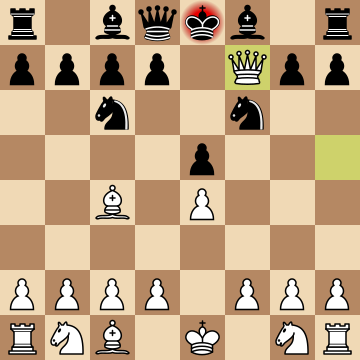
Now, this assignment will focus on a simplified version of chess known as Minichess, to make the computations and algorithms accessible for you on your computer. However, the techniques we’ll learn on this assignment do extend to chess and other games as well! The fundamental question you investigate in this assignment is: using what we’ve learned about trees, what kinds of Minichess AIs can we design and implement, and how well do they play?
This assignment is divided into four parts. In Part 0 (not to be handed in), you learn about the main data types you use for this program, including a game tree that applies what you have learned in lecture. In Part 1, you work with a real-world Minichess data set and build an AI that makes random moves using this dataset as a guide. Then, in Part 2, you develop a recursive algorithm for building up a complete game tree, exploring all possible Minichess move sequences up to a given depth, and build a smarter AI that chooses moves based on estimated win probabilities. Finally, in Part 3, you explore some of the limits of representing games as trees of all possible moves.
Note: start early on this assignment, for a few main reasons:
- It contains more starter code across more files than in previous assignments this year. You need to read the docstrings carefully to understand how to use them.
- The domain and algorithms are fairly complex, even though they don’t actually require very much code to implement! You should spend a lot of your time reading instructions and drawing pictures to make sure you understand what is going on, before writing any code. (This is a good practice to do in general, but even more necessary than usual on this assignment.)
- The concepts build on each other from part to part. You need to have a solid grasp of what you did on Part 1 to complete Part 2.
Logistics
- Due date: Thursday March 5, 1:00pm Toronto time.
- General assignment expectations, including late policy and extensions: see the Assignment Expectations page and the syllabus.
- This assignment must be done individually. The work
you submit must be your own. Please review the Academic Integrity
policies in the syllabus and the
honour_code.txtfile included in the starter files on MarkUs (more below) which gives an overview of common mistakes students make in regards to academic integrity. - You will submit your assignment solutions on MarkUs (see submission instructions at the end of this handout).
- Please review the Course Syllabus section on Academic Integrity.
Starter Files
To obtain the starter files for this assignment:
- Click this link to download the starter files for this assignment. This will download a zip file to your computer.
- Extract the contents of this zip file into your
csc111/assignments/folder. - You should see a new
a2folder that contains the assignment’s starter files. This should look similar to what you had for Assignment 1.
There are more starter files than usual, so please note the following:
- The folder
chessboardcan be completely ignored. This is apygame-based library used for visualizing games only. You won’t be interacting with this library directly (Lightly edited from https://github.com/ahira-justice/chess-board). a2_minichess.pyis a Minichess implementation that handles representing the game board, pieces, making moves, and visualizing games. It also contains a demo game run with two “AIs” that play each other by making purely random moves. You need to understand the public interface of this file, but not its implementation.a2_game_tree.pycontains the commonGameTreedata type you use and modify throughout this assignment.a2_part1.py, anda2_part2.pyare standard starter files where we’ve left instructions and space for you to complete your work on this assignment.
General instructions
This assignment contains a mixture of both written and programming
questions. All of your written work should be completed in the
a2.tex starter file using the LaTeX typesetting language
(hand-written work will not be graded). You went through the process of
getting started with LaTeX in the software installation guide, but for a
quick start we recommend using the online platform Overleaf for LaTeX. Overleaf also
provides many tutorials
to help you get started with LaTeX.
Your programming work should be completed in the starter files provided. We have provided code at the bottom of each file for running doctests and PythonTA on that file. We are not grading doctests on this assignment, but encourage you to add some as a way to understand each function we’ve asked you to complete. We are using PythonTA to grade your work, so please run that on the Python file you submit using the code we’ve provided in the main block.
For this assignment as well as upcoming assignments and project 2, we are requiring that you update to the newest version of PythonTA: 2.12.1. This version of PythonTA has a few new checks that it runs on your code. Instructions for doing this update are on Quercus on the software installation page.
Warning: one of the purposes of this assignment is to evaluate your understanding and mastery of the concepts that we have covered so far. So on this assignment, you may only use parts of the Python programming language that we have covered in the first 15 chapters of the course notes. Other parts are not allowed, and parts of your submissions that use them may receive a grade as low as zero for doing so.
Problem Domain: Minichess
Before continuing on this assignment handout, please review this page introducing Minichess, which is the simplified version of chess that we’ll be studying on this assignment.
Part 0: Representing Minichess in Python
Note: There isn’t anything to be handed in for this part! Instead, please read through this section carefully to learn about the main data types you’ll be working with for this assignment.
The MinichessGame
class
In a2_minichess.py, we have defined a class called
MinichessGame that represents the state of a Minichess
game.
We can initialize a new game of Minichess as follows:
>>> from a2_minichess import MinichessGame
>>> game = MinichessGame()
The MinichessGame class provides two important methods
for making moves that you’ll be using on this assignment. We illustrate
both of them below.
>>> from a2_minichess import MinichessGame
>>> game = MinichessGame()
>>> # Get all valid moves for white at the start of the game.
>>> game.get_valid_moves()
['a2b3', 'b2c3', 'b2a3', 'c2d3', 'c2b3', 'd2c3']
>>> # Make a move. This method mutates the state of the game.
>>> game.make_move('a2b3')
>>> game.get_valid_moves()  # Now, black only has one valid move
['b4b3']
>>> # If you try to make an invalid move, a ValueError is raised.
>>> game.make_move('a4d1')
Traceback (most recent call last):
  File "<input>", line 1, in <module>
ValueError: Move "a4d1" is not valid
>>> # This move is okay.
>>> game.make_move('b4b3')
And finally, if you want to visualize a specific game state, you can call this method:
>>> game.get_url()
'https://lichess.org/analysis/standard/8/8/8/8/rqkr4/pPpp4/1PPP4/RQKR4'
Try opening that URL in your web browser!
The Player abstract
class
The Player abstract class in
a2_minichess.py defines the public interface for a
Minichess AI that we’ll be using throughout this assignment. As you
might expect, you are defining various subclasses of Player
(you might recall that this is very similar to the class structure you
saw in CSC110
extra practice for ch 10):
class Player:
    """An abstract class representing a Minichess AI.

    This class can be subclassed to implement different strategies for playing chess.
    """

    def make_move(self, game: MinichessGame, previous_move: Optional[str]) -> str:
        """Make a move given the current game.

        previous_move is the opponent player's most recent move, or None if no moves
        have been made.

        Preconditions:
            - There is at least one valid move for the given game
        """
        raise NotImplementedError
This is a fairly simple interface: given the current game state and
the opponent player’s most recent move, each subclass must decide what
new move to make. Note that the Player class itself doesn’t
keep track of whether it’s white or black! Instead, whenever
make_move is called, the Player is making a
move as the current player of the game.
We’ve also provided one Player subclass called
RandomPlayer, which makes purely random moves, selecting
from all possible valid moves at the current game state. Please review
the implementation of RandomPlayer.make_move and make sure
you understand how it’s using MinichessGame methods before
moving on.
Running a game
a2_minichess.py provides two functions for running
Minichess games: run_game, which runs a single game between
two Players, and run_games, which allows you
to run multiple games. The main block of this file contains two examples
of calling run_games, and we encourage you to try to run
these for yourself as well.
if __name__ == '__main__':
    # Demo running Minichess games being played between two random players
    run_games(100, RandomPlayer(), RandomPlayer(), show_stats=True)

    # Try running this to visualize games (takes longer per game)
    # run_games(20, RandomPlayer(), RandomPlayer(), visualize=True,
    #           fps=10, show_stats=True)
The GameTree class
The previous sections described the code you’ll use to represent and run games of Minichess. But the true heart of this assignment is in how you’ll use trees to represent a decision tree of Minichess moves, encoding information about sequences of moves that each player can make over the course of a game. For example, here is a decision tree showing different possible moves for a game of Minichess.
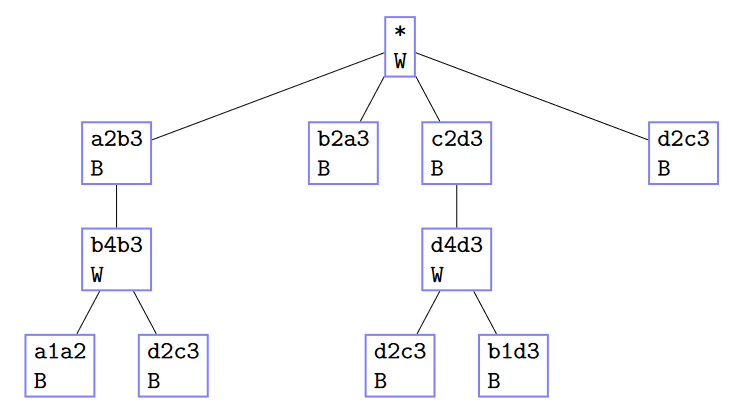
The root of the tree is labelled with * to indicate that
no moves have been performed yet, and every other node is labelled with
a move using the notation described in our
Minichess Overview. Every node also has either a W or
B indicating the current player—note that this player will
make the next move, which is represented by the children of
that node. Note that not all possible moves are shown—when we
get to implementing these game trees, we’ll find that it is
computationally infeasible to create trees showing all possible moves,
and instead study ways of creating trees that just contain a “good
subset” of the moves.
In a2_game_tree.py, the class GameTree
represents these Minichess decision trees. This class is similar to the
Tree class from lecture, except that we’ve replaced the
_root attribute with a few separate instance attributes
storing individual pieces of data, and made those attributes public
(technically we could have just made _root a tuple (or
other collection type) of values, but we wanted to choose meaningful
attribute names for each component, without defining a separate data
type).
class GameTree:
    """A decision tree for Minichess moves.

    Each node in the tree stores a Minichess move and a boolean representing whether
    the current player (who will make the next move) is White or Black.

    Instance Attributes:
      - move: the current chess move (expressed in chess notation), or '*' if this tree
              represents the start of a game
      - is_white_move: True if White is to make the next move after this, False otherwise
    """
    move: str
    is_white_move: bool

    # Private Instance Attributes:
    #  - _subtrees: the subtrees of this tree, which represent the game trees after a possible
    #               move by the current player
    _subtrees: list[GameTree]
Let’s look at an example.
At the start of a game of Minichess, the board looks like this:
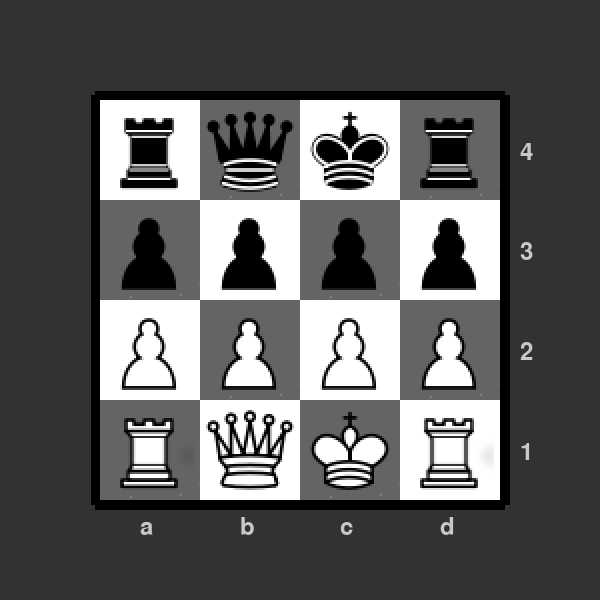
We can represent this starting state with a size-one
GameTreewhose_moveis'*'and whoseis_white_moveisTrue(since it’s white’s turn to move). What about_subtrees? At first we’ll say that no moves are recorded by our game tree, and so_subtreesis empty.Visually, we can represent this
GameTreeas the following (note that we showW/Binstead ofTrue/Falsefor clarity in our diagrams).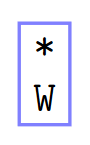
Now let’s suppose we want to record the following sequence of moves:
Move Board state after the move 'c2d3'(white moves its pawn on c2 to d3, capturing a black pawn)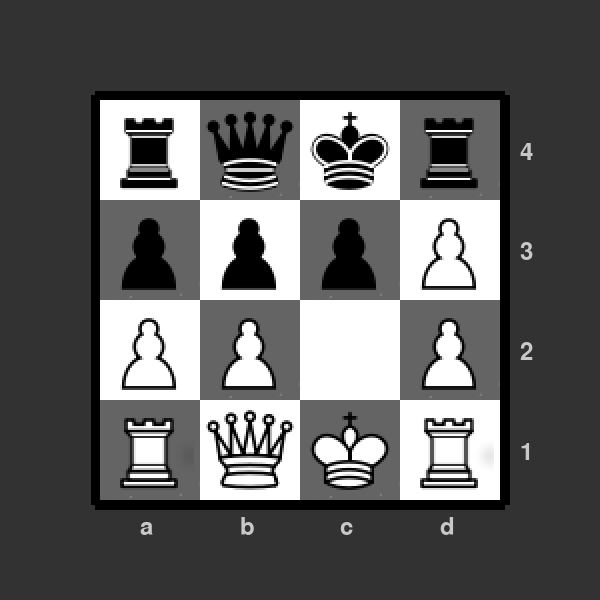
'd4d3'(black moves its rook from d4 to d3, capturing the white pawn)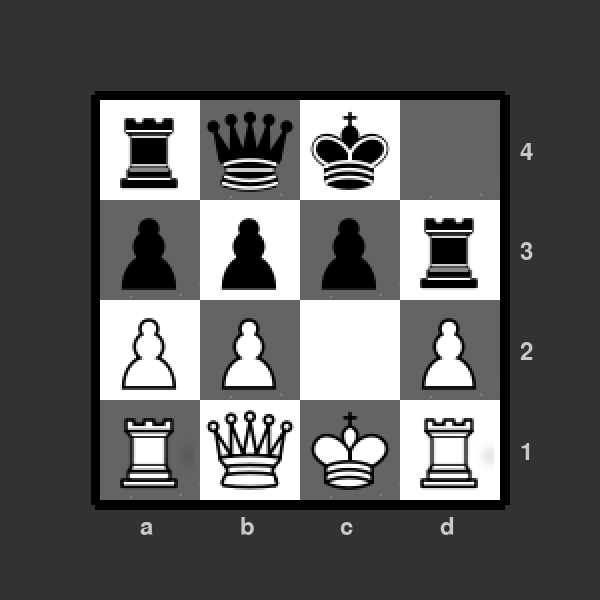
'd2c3'(white moves its pawn on d2 to c3, capturing a black pawn)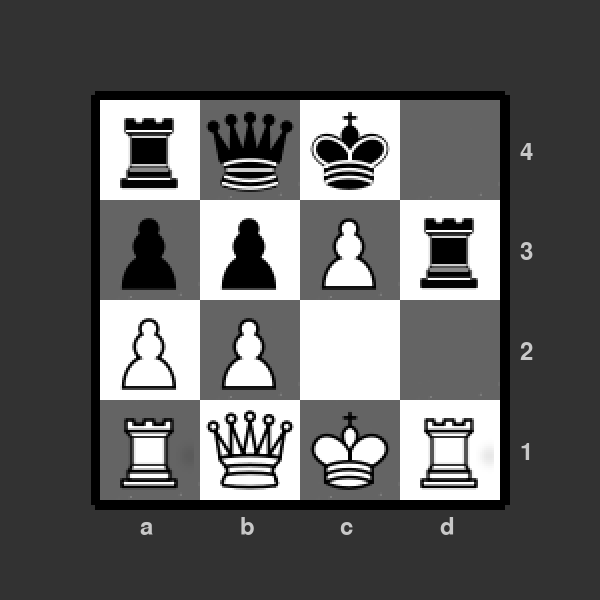
We can do this by adding descendants of our
GameTree’s root, as follows: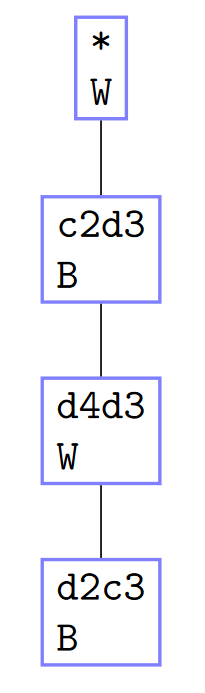
Now suppose that we want to record a slightly different move in the third row of the table:
Move Board state after the move 'c2d3'(white moves its pawn on c2 to d3, capturing a black pawn)'d4d3'(black moves its rook from d4 to d3, capturing the white pawn)(NEW) 'b1d3'(white moves its queen from b1 to d3, capturing the black rook)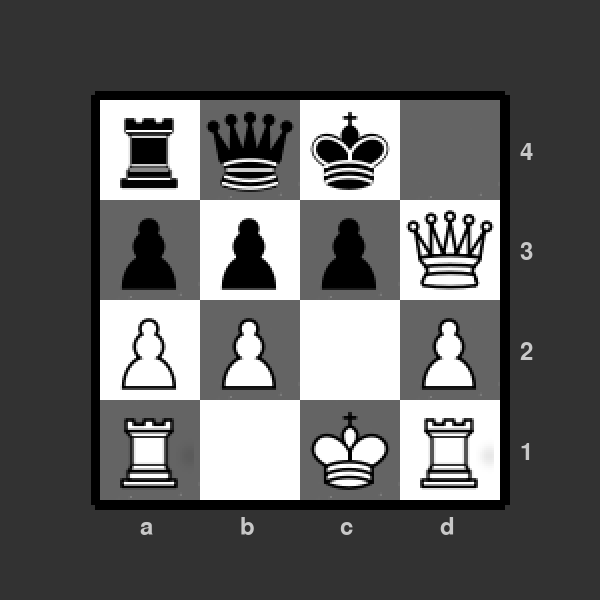
We can add this to our
GameTreeby adding a child of the'd4d3'node:
And finally, we can use our
GameTreeto add all possible opening moves for white. Recall that we can use oura2_minichesslibrary to help us:>>> import a2_minichess >>> game = a2_minichess.MinichessGame() >>> game.get_valid_moves() ['a2b3', 'b2c3', 'b2a3', 'c2d3', 'c2b3', 'd2c3']So here’s how we could update our diagram to show these possible moves (don’t worry about the subtree order right now):
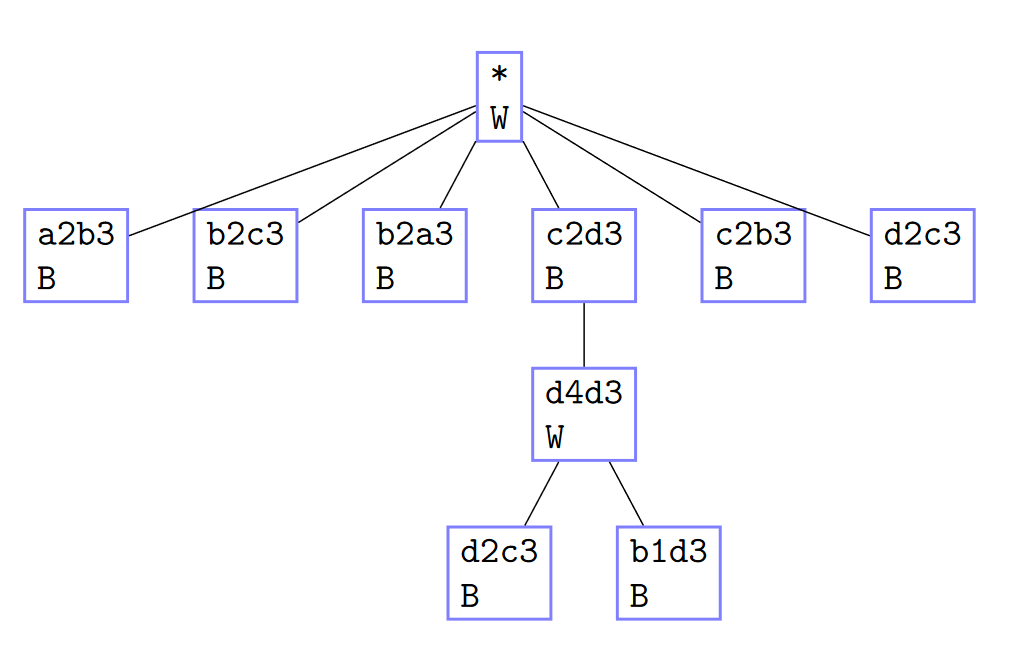
Remember, we don’t expect you to be able to translate the chess move notation into physical chess moves! You’ll be using the
MinichessGameclass to actually compute possible moves and update the state of the game board, so that you don’t have to worry about doing this yourself.
You can see an example of manually creating a GameTree
instance in a2_part0.py. Feel free to experiment more in
this file, as you aren’t handing it in for grading.
Part 1: Loading and “Replaying” Minichess games
Of course, creating GameTrees manually is quite tedious.
So your first task for this assignment is to create
GameTrees by using a “real-world” data set (we actually
generated some fake data sets for this assignment, as this version
Minichess doesn’t have a lot of real data. However, the format is quite
similar to real chess datasets).
In
a2_game_tree.py, implement the methodGameTree.insert_move_sequence, which takes a list of moves and stores them in theGameTree. This is analogous to aTreemethod you implemented in Tutorial 4, but with a different requirement implementation (see starter file for details).In
a2_part1.py, implement the functionload_game_tree, which returns aGameTreefrom a csv file with the following format:- Each line of the file is a sequence of moves, where each move string is separated by a comma.
- The moves all start from the initial game state, with white making the first move.
- All move sequences are valid, and do not necessarily end with a player winning.
For example, given this sample csv contents (also in the starter files under
data/small_sample.csv):a2b3 b2c3 b2a3 c2d3,d4d3,d2c3 c2b3 d2c3 c2d3,d4d3,b1d3The generated
GameTreelooks like the following:
Now let’s put our
GameTrees to use in our Minichess AIs! Ina2_part1.py, we’ve created aPlayersubclass calledRandomTreePlayer, which is initialized with aGameTreeinstance that it uses to make moves.When a
RandomTreePlayeris initialized, its_game_treeattribute refers to aGameTreerepresenting the initial state of the board (before any moves has been played). This player then keeps track of the moves it makes, and the moves its opponent makes, by descending into theGameTree, using code like (this is analogous to a linked listcurr = curr.nextupdate):self._game_tree = ... self._game_tree ...RandomTreePlayer AI
Formally, on a
RandomTreePlayer’s turn, it does two things:First it updates its game tree to the subtree corresponding to the move made by its opponent. If no subtree is found, its game tree is set to
None.The player picks its move based on the following conditions:
- If its game tree is
Noneor is just a leaf no subtrees, it picks a random move from all valid moves from the game, likeRandomPlayer. - Otherwise, it picks a random move from among its game tree’s subtrees.
- If its game tree is
Let’s illustrate this with an example. Suppose we create a
RandomTreePlayerwith the followingGameTree:
Suppose this
RandomTreePlayeracts as white, so it goes first.On its first move, its game tree has 6 possible moves to choose from (one for each subtree). It picks one at random. Suppose it picks
'c2d3'. The player makes that move, and then updates its game tree to be the corresponding subtree: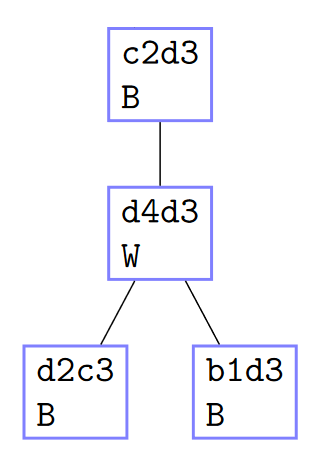
Suppose black makes the move
'd4d3'.Then on our player’s turn, it first updates its game tree to be the subtree corresponding to this move:
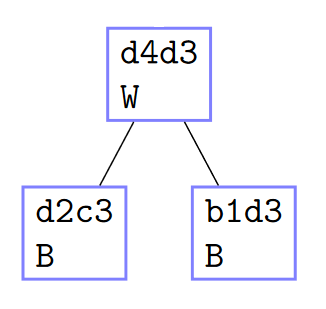
And now there are two moves that it can choose from. Suppose it chooses
'b1d3', and updates its game tree to be the right subtree.Suppose black makes the move
'c4d3'.There is no subtree in our player’s game tree that corresponds to the opponent’s move
'c4d3'!So then the player sets its game tree to
None, and makes purely random moves for the rest of the game.
Note that in this example, we could have reached a
Nonegame tree much earlier. For example, if the player’s opening move had been'a2b3', then no matter what move black played, there wouldn’t have been a subtree corresponding to the move, and so the player’s game tree would have been set toNoneat the start of their second turn.Your task is to implement
RandomTreePlayer.make_moveaccording to the strategy defined above.Finally, let’s put our
RandomTreePlayerto use. The last function you’ll implement for Part 1 ispart1_runner, which creates a game tree based on csv data, and runs a series of Minichess games between two players with the following two possible configurations:- White is a
RandomTreePlayerwith the given game tree, Black is aRandomPlayer. - Both White and Black are
RandomTreePlayers that use the same game tree.
In
data/white_wins.csv, we’ve curated a record of 2000 games of Minichess where the White player always won. Try callingpart1_runnerwith this dataset in the Python console, for both modes. You’ll find that the first mode (where the game is played against aRandomPlayer), the White player doesn’t win very much, but in the second mode (where both players are using the same game tree), White wins 100% of the time! Essentially, Black is forced to make moves constrained by the game tree, and every path down the tree leads to White winning.Not very impressive, but it’s a start!
- White is a
Part 2: Complete Game Trees and Win Probabilities
In the previous part, we built GameTrees by using
datasets of real Minichess games. In this part, we’ll explore how we can
construct GameTrees when we don’t have such a dataset
available.
A conceptually simple way to construct a
GameTreeis to create a complete tree, i.e., one that shows all possible moves that each player could make. Unfortunately, this is not computationally feasible: even for the small game of Minichess, the number of possible move sequences is enormous, and would take a very long time for a computer to compute.So instead, you’ll use a slightly smarter approach: create a complete
GameTreeup to a given depthd, which corresponds to all possible move sequences of length at mostd. (The “at most” is because a given move sequence might result in a checkmate beforedmoves, and this should be contained in the tree.) This will still allow us to create a game tree by exploring all possible moves, but limit the exploration to a computationally feasible amount.So for example, if we start with a
GameTreewith just the initial state of the board, then:- A complete game tree with depth 0 would simply contain the starting state.
- A complete game tree with depth 1 would contain the starting state, and children for all possible initial moves for White.
- A complete game tree with depth 2 would contain the starting state, children for all possible initial moves for White, and then all possible first moves for Black in response to those moves.
Open
a2_part2.py, and implement the functiongenerate_complete_game_tree.Next, we want to have our Minichess AI use
GameTrees in a more sophisticated way than simply making random choices for each move. To do this, we’ll need to track how “good” each move is in aGameTree.For this question, we’ll focus on the White player. Your task is to add a new public instance attribute
white_win_probabilityto theGameTreeclass, which represents the probability that White will win from the current state of the game, assuming that:- White always chooses the move that leads to the subtree with the highest win probability.
- Black always chooses a random subtree when making a move.
To do this, you’ll need to make a few changes to the
GameTreeclass:- Add the new instance attribute
white_win_probability(type annotation and documentation!), and add a representation invariant that it is between 0 and 1 inclusive. - Add an optional parameter to
GameTree.__init__that allows a user to specify a win probability when creating a newGameTree.- Your optional parameter must come after the existing parameters.
- The default value of the parameter is 0.0.
- Implement the method
GameTree._update_white_win_probability, which updatesself.white_win_probabilitybased on the mathematical definition found in its docstring. Call this method inGameTree.add_subtreeto update the win probability when a new subtree is added. - Add an optional parameter to
GameTree.insert_move_sequenceto specify a win probability when inserting a move sequence that results in a new node being created.- Same instructions as (b) apply.
- If the given move sequence traces a path that is already entirely in the tree, no win probabilities should be updated, as no new nodes are actually added to the tree.
- Otherwise, for the given move sequence, any existing nodes on the path should have their win probabilities updated based on the new nodes’ win probabilities.
- Finally, modify
generate_complete_game_treeina2_part2.pyso that when it creates a newGameTree, if the current game state’s winner is'White', the newGameTreeis given a white win probability of1.0. (In all other cases, we keep the win probability at0.0. This is very conservative, as it equates draws with Black wins! But it’s the simplest approach for this assignment.)
Complete the implementation of
GreedyTreePlayer, a newPlayersubclass ina2_part2.py, according to the following description.GreedyTreePlayer AI
This player is very similar to
RandomTreePlayer, except now whenself._game_treeis notNoneand has at least one subtree:- If playing as White, the player picks the subtree with the
highest
white_win_probability. - if playing as Black, the player picks the subtree with the
lowest
white_win_probability.
If there are ties, pick the leftmost subtree with the max/min white win probability.
- If playing as White, the player picks the subtree with the
highest
Finally, complete the function
part2_runner, which puts together all of your work for this part.Try calling this function with depth 5, and between 20-50 games. You should see that White wins a clear majority of the time—much better than the
RandomTreePlayerfrom Part 1!On the other hand, try swapping the players, so White is the
RandomPlayerand Black is theGreedyTreePlayer. Even though the tree is the exact same, Black doesn’t do well at all. Remember how we defined the win probabilities: White always makes the “best” move, but Black chooses randomly; and the probabilities assign “Draw” and “Black wins” as the same value (0.0), even though these are very different from Black’s point of view. Thewhite_win_probabilityattribute values are biased in favour of White—they aren’t as useful to the Black player.
Part 3: The Combinatorial Explosion
Note: this part is a written response, and should be completed
entirely in a2.tex.
In Part 2, we said that it is computationally infeasible to build the tree of all possible moves. In this question, we explore the possible size of the game tree.
On a single turn, what is an upper bound for the number of legal moves that a player can have? Justify your answer. Any bound that is reasonable and sensibly justified is acceptable, even if it is not as low as it could be.
Recall that for our game of minichess, there can be a maximum of 50 moves. Using your response to question 1, give an upper bound on the number of nodes in the complete game tree by considering the tree where each node has the maximum possible number of children. Note that this answer is also equivalent to the number of possible distinct games two players can have as well. Justify your answer. Like question 1, any bound that is reasonable and sensibly justified is acceptable.
Hint: you may want to look at the formula for the sum of a geometric series.
Submission instructions
Please proofread and test your work carefully before your final submission!
Login to MarkUs.
Go to Assignment 2, and the “Submissions” tab.
Submit the following files:
a2_game_tree.py,a2_part1.py,a2_part2.py,a2.tex,a2.pdf, andhonour_code.txt.Please note that MarkUs is picky with filenames, and so your filenames must match these exactly, including using lowercase letters.
Note: for your Python code files, please make sure they run (in the Python console) before submitting them! Code submissions that do not run will receive a grade of zero for that part, which we do not want to happen to any of you, so please check your work carefully.
Refresh the page, and then download each file to make sure you submitted the right version.
Remember, you can submit your files multiple times before the due date. So you can aim to submit your work early, and if you find an error or a place to improve before the due date, you can still make your changes and resubmit your work.
After you’ve submitted your work, please give yourself a well-deserved pat on the back and go take a rest or do something fun or eat some chocolate!